

If you’re encountering the “ERROR 1273 (HY000): Unknown collation: ‘utf8mb4_unicode_520_ci‘” issue, it’s likely because your MySQL or MariaDB server does not support the utf8mb4_unicode_520_ci collation. This collation was introduced in MySQL 5.7.6 and may not be available on older versions or certain MariaDB versions.
Here’s how you can resolve this issue:
Identify Unsupported Collation: Check which collation is causing the issue by examining your SQL file. Open the file in a text editor and look for instances of utf8mb4_unicode_520_ci.
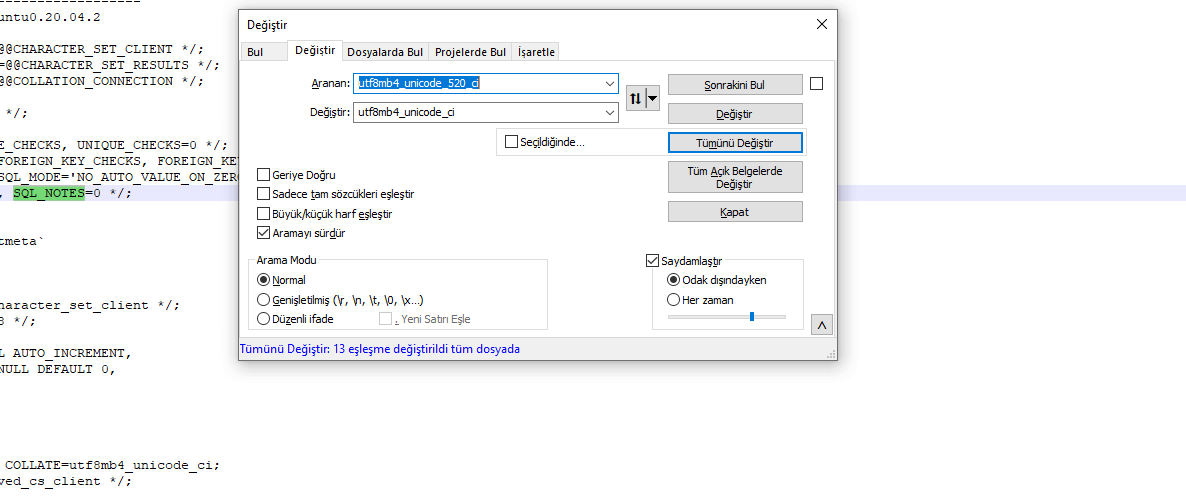
Replace with Supported Collation: Replace utf8mb4_unicode_520_ci with utf8mb4_unicode_ci or another compatible collation. This can often be done using a find-and-replace feature in your text editor:
utf8mb4_unicode_520_ci ➔ utf8mb4_unicode_ci
Save and Re-import: After making the changes, save the file and try re-importing it into your database.
Alternative Solution Using Command Line: You can also specify the default collation when creating the database.
For example:
CREATE DATABASE your_database_name CHARACTER SET utf8mb4 COLLATE utf8mb4_unicode_ci;
Upgrade MySQL/MariaDB Version (if possible): Consider updating to a more recent version of MySQL or MariaDB that supports utf8mb4_unicode_520_ci if it is essential for your project.
By following these steps, you should be able to resolve the collation error and proceed with your database import or migration.
Bilgiyi uygulanabilir projeye dönüştürelim.
İhtiyacınızı teknik, operasyonel ve ticari açıdan değerlendirip doğru çözüm yol haritasını birlikte oluşturalım.
Projenizi Anlatın